CupertinoTimerPicker
A countdown timer picker in iOS style.
Examples
Basic Example
- Python
import time
import flet as ft

def main(page):
    page.theme_mode = ft.ThemeMode.LIGHT
    page.horizontal_alignment = ft.CrossAxisAlignment.CENTER

    timer_picker_value_ref = ft.Ref[ft.Text]()

    def handle_timer_picker_change(e):
        val = int(e.data)
        timer_picker_value_ref.current.value = time.strftime(
            "%H:%M:%S", time.gmtime(val)
        )
        page.update()

    timer_picker = ft.CupertinoTimerPicker(
        value=3600,
        second_interval=10,
        minute_interval=1,
        mode=ft.CupertinoTimerPickerMode.HOUR_MINUTE_SECONDS,
        on_change=handle_timer_picker_change,
    )

    page.add(
        ft.Row(
            tight=True,
            controls=[
                ft.Text("TimerPicker Value:", size=23),
                ft.TextButton(
                    content=ft.Text("00:01:10", size=23, ref=timer_picker_value_ref),
                    style=ft.ButtonStyle(color=ft.colors.RED),
                    on_click=lambda _: page.show_bottom_sheet(
                        ft.CupertinoBottomSheet(
                            timer_picker,
                            height=216,
                            padding=ft.padding.only(top=6),
                        )
                    ),
                ),
            ],
        ),
    )

ft.app(target=main)
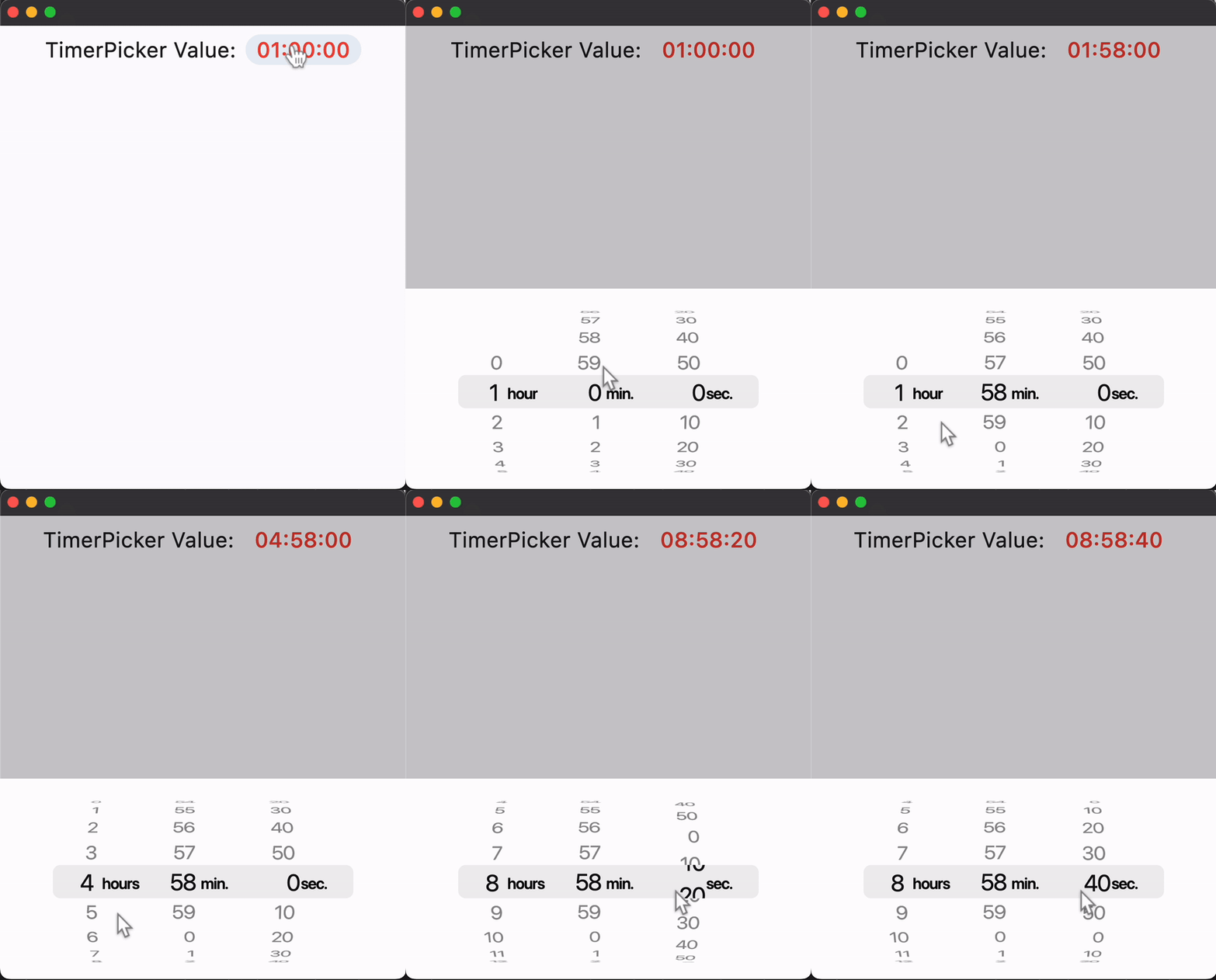
Properties
alignment
Defines how the timer picker should be positioned within its parent. Defaults to ft.alignment.center.
bgcolor
The background color of the timer picker.
mode
The mode of the timer picker. Property value is CupertinoTimerPickerMode enum with the following values:
HOUR_MINUTE- shows the timer duration in hour and minute.MINUTE_SECOND- shows the timer duration in minute and second.HOUR_MINUTE_SECOND(default) - shows the timer duration in hour, minute, and second.
item_extent
The uniform height of all children. Defaults to 32.
second_interval
The granularity of the second spinner. Must be a positive integer factor of 60. Defaults to 1.
minute_interval
The granularity of the minute spinner. Must be a positive integer factor of 60. Defaults to 1.
value
The initial duration in seconds of the countdown timer. Defaults to 0.
Events
on_change
Fires when the timer duration changes.